


Automate Your Fiverr Workflow with Make.com: Save Time and Scale Your Freelance Operations

In the competitive world of online freelancing, efficiency is not just an advantage; it’s a necessity. For sellers on the Fiverr platform, manual management of repetitive tasks can consume valuable time better spent on core client work. This is where strategic automation becomes a game-changer. By leveraging tools and technologies, freelancers can streamline operations, reduce errors, and create a more scalable business model, directly contributing to growth and improved client satisfaction.
Table Of Content
- Fiverr Automation: Streamline Your Workflow and Scale Your Freelance Business
- Key Areas for Automation Implementation
- Automating Client Communication and Onboarding
- Key Tools for Streamlined Workflow
- Setting Up Automated Responses for Common Inquiries
- Key Components for an Automated Response System
- Creating a Template-Based Welcome Packet for New Clients
- Key Components for Your Automated Packet
- Using Bots to Qualify Leads and Schedule Discovery Calls
- Key Benefits of This Automated Workflow
- Automating Order Instructions and File Collection
- Key Methods for Streamlining the Process
- Integrating Fiverr with Your Core Business Tools
- Common Automation Workflows
- Connecting Fiverr to Your Calendar for Seamless Booking
- Core Benefits of Calendar Integration
- Syncing Orders with Project Management Software
- The Automated Workflow Advantage
- Q&A
- What are the first tasks I should automate on Fiverr?
- Can automation hurt my client relationships by making me seem less personal?
- Are there tools outside of Fiverr that help with automation?
- How do I balance automation with maintaining the quality of my service?
- Leverage Fiverr API and no-code platforms like Make or Zapier to connect gigs to CRM, calendars, and accounting for seamless integrations.
- Automate client communication with saved responses, triggered messages, and template-based onboarding to ensure consistent, fast, professional replies.
- Sync orders to project management and calendar apps so new orders create tasks, set due dates, and block delivery time automatically.
- Automate order instructions, file collection, and file handling with API or scripts to eliminate back-and-forth and centralize client assets.
The foundation of effective Fiverr automation often begins with understanding the platform’s own capabilities and external tools. Many sellers automate responses to frequent buyer inquiries, status updates for their gig orders, and even parts of their service delivery. Utilizing scripts for batch processing or template-based workflows can significantly cut down on administrative overhead. Furthermore, exploring API integration possibilities allows for connecting your Fiverr business with other critical software, such as CRM systems, calendars, or accounting tools, creating a seamless operational ecosystem.
Ultimately, implementing automation transforms a reactive freelance practice into a proactive, system-driven business. It empowers sellers to handle higher order volumes without compromising quality, ensures consistent communication, and frees up creative and strategic energy. Embracing these technologies is a decisive step toward building a more resilient and profitable presence on the Fiverr platform, setting the stage for sustained success in the dynamic gig economy.
Fiverr Automation: Streamline Your Workflow and Scale Your Freelance Business
In the competitive world of online freelancing, manual management of every gig and client interaction can stifle growth. Automation is the key to unlocking efficiency, allowing you to focus on high-value creative work while systems handle repetitive tasks. By strategically implementing automated tools, you can transform your Fiverr business from a time-consuming operation into a scalable, streamlined enterprise. This approach is essential for any serious freelance professional looking to increase order volume without compromising on quality or burning out.
The foundation of a powerful automated workflow often involves leveraging Fiverr’s own API and third-party tools. The API allows for deep integration with other software, enabling actions like auto-syncing new orders to your project management tool or automatically sending delivery files. Beyond the API, simple scripts can automate file processing, data entry, or communication templates, saving you countless hours per week. The goal is to create a seamless pipeline where information flows automatically between systems.
Key Areas for Automation Implementation
To effectively scale, consider automating these core aspects of your freelance business on Fiverr:
- Communication: Use saved responses and templates for common questions, order requirements, and delivery messages.
- Order Management: Set up triggers to notify you of new orders or updates and auto-import details into your tracking system.
- File Handling: Create scripts to rename, convert, or organize delivered files based on the gig and client name.
- Marketing & Analytics: Automate periodic reports on your gig performance and client feedback.
Remember, successful automation is about smart integration, not complete replacement. Start by mapping your current workflow, identify the most repetitive bottlenecks, and introduce automation tools gradually. This measured approach ensures your system remains reliable and client-centric.
| Automation Tool | Primary Function | Impact on Workflow |
|---|---|---|
| Fiverr API | Data Sync & Integration | Connects Fiverr to external apps (CRM, Google Sheets). |
| Custom Scripts (e.g., Python) | File & Task Automation | Automates batch processing and repetitive computer tasks. |
| Browser Extensions | In-Browser Actions | Speeds up navigation and order management on the site itself. |
| Zapier/Make | No-Code Workflow Builder | Creates automated connections between Fiverr and 1000s of apps without coding. |
Automating Client Communication and Onboarding
On the Fiverr platform, managing repetitive messages can consume hours better spent on actual freelance work. Automating client communication is the key to reclaiming that time. By utilizing saved responses, or scripts, for common inquiries about your gig, delivery times, or process, you ensure instant, consistent, and professional replies. This foundational automation sets clear expectations from the very first interaction and filters serious buyers, streamlining your workflow significantly.
Taking automation a step further involves the client onboarding process. Once an order is placed, a triggered sequence of messages can welcome the client, request specific project details, and share access to necessary tools or forms. For advanced users, leveraging Fiverr’s API allows for powerful integration with external CRM systems or project management apps. This can automatically create tasks, update calendars, and sync client data, transforming a simple order into a seamlessly m naged project.
Key Tools for Streamlined Workflow
Effective automation combines native Fiverr features with external tools. Consider this ecosystem:
- Fiverr’s Quick Responses: Pre-written scripts for FAQs and updates.
- Order Instructions: Automated details request upon purchase.
- API Integrations: Connect your gig to tools like Zapier or custom dashboards.
| Process Stage | Automation Tool | Outcome |
|---|---|---|
| Pre-Order Questions | Saved Replies (Scripts) | Faster response, higher conversion |
| Order Confirmation | Auto-Send Instructions | Clear onboarding, less confusion |
| Post-Order Management | API Integration | Unified task tracking across platforms |
Ultimately, implementing these systems minimizes manual effort, reduces errors, and provides a superior client experience. This professional approach not only boosts your efficiency but also positions your freelance business for sustainable growth on and beyond the Fiverr marketplace.
Setting Up Automated Responses for Common Inquiries
On the Fiverr platform, efficiency is key to scaling your freelance business. Manually answering the same questions about your services, pricing, or availability consumes valuable time that could be spent on core client work. This is where intelligent automation becomes a game-changer. By setting up automated responses, you ensure instant, professional communication with potential buyers, improving their experience and your conversion rates from the very first interaction.
Implementing this workflow often involves using tools that allow for rule-based messaging. For example, you can create templates for frequent inquiries regarding project timelines, custom offers, or your revision policy. A more advanced approach leverages the Fiverr API through custom scripts or third-party services. This integration can trigger specific, contextual replies based on keywords found in a buyer’s message, creating a seamless and responsive communication system.
Key Components for an Automated Response System
To build an effective system, focus on these elements:
- Template Library: A collection of pre-written, polished responses for common scenarios.
- Trigger Words: Keywords like “price,” “deadline,” or “portfolio” that activate a specific automated reply.
- API Integration: Connecting external tools to the Fiverr platform to read and send messages programmatically.
- Workflow Logic: Rules that determine which response is sent and when, ensuring relevance.
Consider the following common inquiry types and automation actions:
| Inquiry Type | Suggested Automated Action |
|---|---|
| “What’s your price for…?” | Send a templated response with a link to your packages and an offer to customize. |
| “Are you available?” | Reply with your current delivery timeline and a link to your calendar for booking. |
| “Can I see more examples?” | Automatically provide a link to your portfolio or a specific case study. |
Ultimately, this strategic use of automation streamlines your workflow, allowing you to focus on delivering exceptional work. It projects professionalism and responsiveness, crucial factors for growth on a competitive freelance platform like Fiverr. Remember, the goal is not to replace human interaction but to enhance it by handling routine tasks, so you can dedicate more energy to complex client needs and business development.
Creating a Template-Based Welcome Packet for New Clients
In the fast-paced freelance world on Fiverr, first impressions are crucial for securing long-term collaboration. A template-based welcome packet automates this essential touchpoint, instantly projecting professionalism and setting clear expectations. By preparing a standardized document that outlines your process, communication guidelines, and project scope, you eliminate repetitive typing and ensure every client receives consistent, comprehensive information the moment they book your gig. This foundational step is key to streamlining your workflow from the very first interaction.
Leveraging automation tools can take your welcome packet to the next level. Instead of manually sending files, you can use Fiverr‘s features or external tools to trigger automatic delivery upon order placement. For maximum efficiency, explore integration possibilities through third-party apps or API connections that link your project management platform to your Fiverr inbox. This allows the welcome packet to be sent directly, and can even initiate other automated workflow steps, such as creating a task in your Trello board or sending a follow-up calendar invite.
Key Components for Your Automated Packet
Your template should be a comprehensive guide that empowers the client and protects your time. Essential elements include a warm thank-you message, a clear project roadmap with milestones, your preferred communication channels and response times, and a list of required materials from the client to begin work. You can also incorporate standardized scripts for common questions to further reduce back-and-forth.
- Professional Introduction & Service Confirmation
- Detailed Step-by-Step Process Overview
- File Submission Guidelines & Communication Protocol
- FAQ Section with Pre-Written Answer Scripts
| Template Section | Automation Benefit |
|---|---|
| Project Questionnaire | Auto-collects data for your workflow platform |
| Payment & Revision Policy | Sets clear boundaries, reduces disputes |
| Next Steps Call-to-Action | Guides client, keeps project moving forward |
Ultimately, a well-crafted, automated welcome packet transforms a simple order into a structured client onboarding experience. It not only boosts your efficiency but also builds trust, minimizes misunderstandings, and frees you to focus on the creative or technical work that grows your freelance business. This systematic approach is a cornerstone of a scalable Fiverr operation.
Using Bots to Qualify Leads and Schedule Discovery Calls
On the Fiverr platform, managing inbound inquiries can quickly become a time-consuming bottleneck. Manual back-and-forth to determine a client’s budget, timeline, and project scope eats into the hours you could spend on billable freelance work. This is where strategic automation becomes a game-changer. By implementing bots or automated scripts, you can pre-qualify leads directly within your Fiverr messages or an external system, ensuring you only invest in detailed discovery calls with serious, aligned prospects.
The core of this system often lies in a smart workflow that triggers an automated sequence after an initial buyer inquiry. A bot can ask a few crucial qualifying questions–pre-defined by you–and analyze the responses. For more advanced integration, you might use Fiverr’s API (where available) or third-party tools to connect your inbox to a CRM. This seamless integration allows the bot to not only gather information but also instantly check your calendar availability and offer time slots for a discovery call, all without you lifting a finger.
Key Benefits of This Automated Workflow
- 24/7 Lead Engagement: Instantly respond to potential clients in any time zone, capturing interest when it’s hottest.
- Consistent Qualification: Every lead is asked the same key questions, ensuring no critical pre-call data is missed.
- Efficient Scheduling: Eliminate the tedious “when are you available?” email chain with automated calendar integration.
Ultimately, this layer of automation does more than just save time; it projects professionalism. It allows you, as a freelancer, to focus your energy on high-value tasks like crafting proposals and delivering exceptional work, while the system handles the initial sorting and booking. By leveraging scripts and API connections, you transform your Fiverr business operations from reactive to strategically proactive.
Automating Order Instructions and File Collection
For a busy freelance professional on Fiverr, manually sending requirements and collecting assets for every order is a significant time drain. This repetitive process can slow down your workflow and create bottlenecks, especially when managing multiple gig orders simultaneously. Automation here is key to reclaiming those hours and ensuring a consistent, professional experience for every client from the very first interaction.
By leveraging Fiverr’s own API or third-party tools, you can create systems that handle these initial steps automatically. This involves setting up predefined templates for order instructions and establishing a structured, secure method for clients to submit their files. The goal is to eliminate back-and-forth messages and ensure you have all the necessary information and materials before you even start the work.
Key Methods for Streamlining the Process
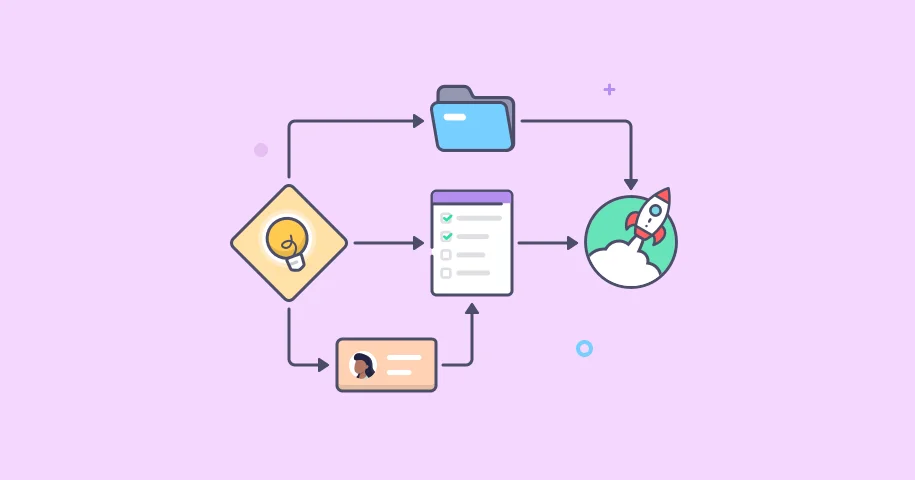
Effective implementation can be achieved through several approaches:
- Using the Fiverr API to trigger automatic messages with custom questionnaires upon order placement.
- Developing custom scripts that generate personalized Google Forms or other secure upload links sent directly to the buyer.
- Setting up a dedicated integration between your Fiverr account and a cloud storage platform like Dropbox or Google Drive for seamless file collection.
| Manual Process | Automated Solution | Benefit |
|---|---|---|
| Copy-pasting instructions for each order | API-triggered template messages | Consistency & saved time |
| Emailing file request links | Auto-generated upload portal link in first message | Professionalism & centralized assets |
| Manually downloading and organizing client files | Direct integration with cloud storage | Reduced errors & automatic backup |
Ultimately, automating this initial phase of the order workflow minimizes administrative tasks, reduces the chance of human error, and allows you to focus your energy on the actual freelance work that grows your business. It establishes a scalable system where the platform works for you, enhancing efficiency and client satisfaction with every new gig order.
Integrating Fiverr with Your Core Business Tools
For serious freelancers and small agencies, true efficiency on the Fiverr platform comes from moving beyond manual management. The key is integration with the other software that powers your business. By connecting Fiverr to your CRM, project management, accounting, and communication tools, you create a unified workflow that eliminates repetitive tasks, reduces errors, and ensures nothing falls through the cracks.
Leveraging the Fiverr API or third-party automation platforms like Zapier allows you to build powerful connections. For instance, a new order for a specific gig can automatically generate a task in Asana, a contact in your CRM, and an invoice draft–all without you lifting a finger. This level of automation turns your Fiverr business into a well-oiled machine, freeing you to focus on the core creative or strategic work that clients are paying for.
Common Automation Workflows
Consider implementing these integrated processes to boost your operational efficiency:
- Order to Project Kickoff: A new Fiverr order triggers a project card in Trello, sends a welcome email via Gmail, and logs the deadline in Google Calendar.
- Delivery to Accounting: Marking an order as delivered automatically creates a record in accounting software like QuickBooks and notifies the client via a connected messaging platform.
- Review Management: A new positive review on your gig is posted to a dedicated Slack channel for team celebration and social proof gathering.
For those with technical skills, writing custom scripts using the Fiverr API unlocks even deeper integration. You could automate custom reporting, synchronize inventory levels for physical goods, or batch-update multiple gig prices based on an external spreadsheet. While this requires more setup, the payoff in tailored automation is significant.
| Business Tool | Integration Purpose | Key Benefit |
|---|---|---|
| CRM (e.g., HubSpot) | Sync new buyer contacts & order history | Better client relationship management |
| Cloud Storage (e.g., Google Drive) | Auto-save delivered work & assets | Centralized, safe file archive |
| Communication (e.g., Slack) | Get real-time notifications for orders & messages | Faster response times |
Connecting Fiverr to Your Calendar for Seamless Booking

For any serious freelance professional on Fiverr, managing orders and availability manually is a major bottleneck. The key to scaling your business lies in automation, and one of the most impactful integrations connects your Fiverr account directly to your digital calendar. This integration automatically blocks off time when you receive a new order, preventing double-booking and ensuring you always meet your delivery deadlines without constant manual updates.
Setting up this connection typically involves using Fiverr’s API or third-party automation platforms like Zapier or Make. These tools act as a bridge, creating a seamless workflow where an event on Fiverr triggers an action in your calendar app. For advanced users, custom scripts can be written to handle more complex scheduling logic, offering a tailored automation solution that fits your specific business operations perfectly.
Core Benefits of Calendar Integration
- Eliminate Scheduling Conflicts: Automatic calendar blocking protects your time the moment an order is placed.
- Streamlined Workflow: Reduces administrative tasks, letting you focus on the actual freelance work.
- Enhanced Professionalism: Clients trust a seller who has a reliable and organized system in place.
| Component | Role in Automation |
|---|---|
| Fiverr API | Provides the data trigger (new order, update). |
| Automation Platform | Connects Fiverr to your calendar service using pre-built “Zaps” or scenarios. |
| Your Calendar | Receives the new event, blocking time and syncing across all devices. |
Ultimately, this automation transforms your freelance business on the Fiverr platform from a reactive operation into a proactive, efficient machine. By leveraging this integration, you not only boost your personal efficiency but also create a more scalable and client-friendly service, which is essential for long-term growth.
Syncing Orders with Project Management Software
Integrating your Fiverr orders directly into Trello, Asana, or similar platforms is a transformative automation step. It eliminates the manual, error-prone process of copying order details, deadlines, and client requirements. This seamless integration ensures that every new project from your Fiverr gig instantly becomes a tracked task in your central command center, keeping your entire operation synchronized.
By leveraging the Fiverr API through custom scripts or third-party automation tools, you create a dynamic bridge between platforms. This connection automatically populates project cards with key information, sets due dates, and can even notify team members. The result is a drastic reduction in administrative overhead and a significant boost in professional reliability, as nothing slips through the cracks.
The Automated Workflow Advantage
Implementing this sync turns a reactive workflow into a proactive one. The moment an order is placed, your project management system springs into action, defining the next steps before you even log in. This is crucial for scaling your freelance business, as it allows you to handle a higher volume of orders without a corresponding increase in management chaos.
Consider the typical data flow enabled by this setup:
| Trigger | Action in PM Software |
| New Fiverr Order | Creates a new card/ task. |
| Order Deadline | Sets the due date & reminders. |
| Buyer’s Requirements | Populates the card description. |
| Order Status Change | Moves card to appropriate list (e.g., “In Progress,” “Review”). |
To get started, you can explore several paths:
- Use native integrations from automation platforms like Zapier or Make.
- Develop custom scripts using the Fiverr API for a tailored solution.
- Utilize browser extensions designed for specific PM tools.
In summary, syncing Fiverr with project management software is not just a minor efficiency tweak; it’s a foundational automation that redefines your operational workflow. It empowers you to deliver consistent quality, meet deadlines reliably, and present a highly professional front to clients–all essential factors for sustainable growth on the Fiverr platform and beyond.
Q&A:
What are the first tasks I should automate on Fiverr?
A good starting point is automating repetitive communication. Set up saved responses for common buyer questions about your process, pricing, and requirements. Next, use Fiverr’s “Quick Responses” or a simple text expander tool to handle frequent messages. Automating initial client intake by creating a standard questionnaire for new orders is also highly effective. This saves time and ensures you collect all necessary information upfront.
Can automation hurt my client relationships by making me seem less personal?
It can if used poorly. The goal is to automate the background tasks, not the relationship itself. Use automated messages for confirmations, status updates, or sending standard questionnaires. Always personalize the first message to a new client and any communication discussing their specific project needs. Automation should free up your time to provide more personalized, thoughtful service on the creative or strategic work that matters most to the client.
Are there tools outside of Fiverr that help with automation?
Yes, several external tools integrate well. For scheduling meetings without back-and-forth emails, consider Calendly or SavvyCal. For managing multiple social media accounts to promote your gigs, tools like Buffer or Later can be useful. For more complex workflows, such as automatically sending files to a cloud storage service when an order is delivered, platforms like Zapier or IFTTT can connect Fiverr to hundreds of other apps.
How do I balance automation with maintaining the quality of my service?
Regularly review and update your automated systems. Check your saved responses every few months to see if they still sound relevant. Monitor client feedback for any comments about communication feeling robotic. Keep key interactions human: the project brief discussion, custom proposal writing, and delivery of the final work should have a personal touch. Use the time you save through automation to focus on these quality areas, improving your core service and allowing for more client attention.